

Google Ads Quality Score: 7 Fixes That Lower Your CPC in 2026
Is a poor Quality Score quietly destroying your ad budget? A QS of 3 can cost you 400% more per click than a competitor with a QS of 9 — for the exact same keyword. Here are 7 fixes you can start implementing today.
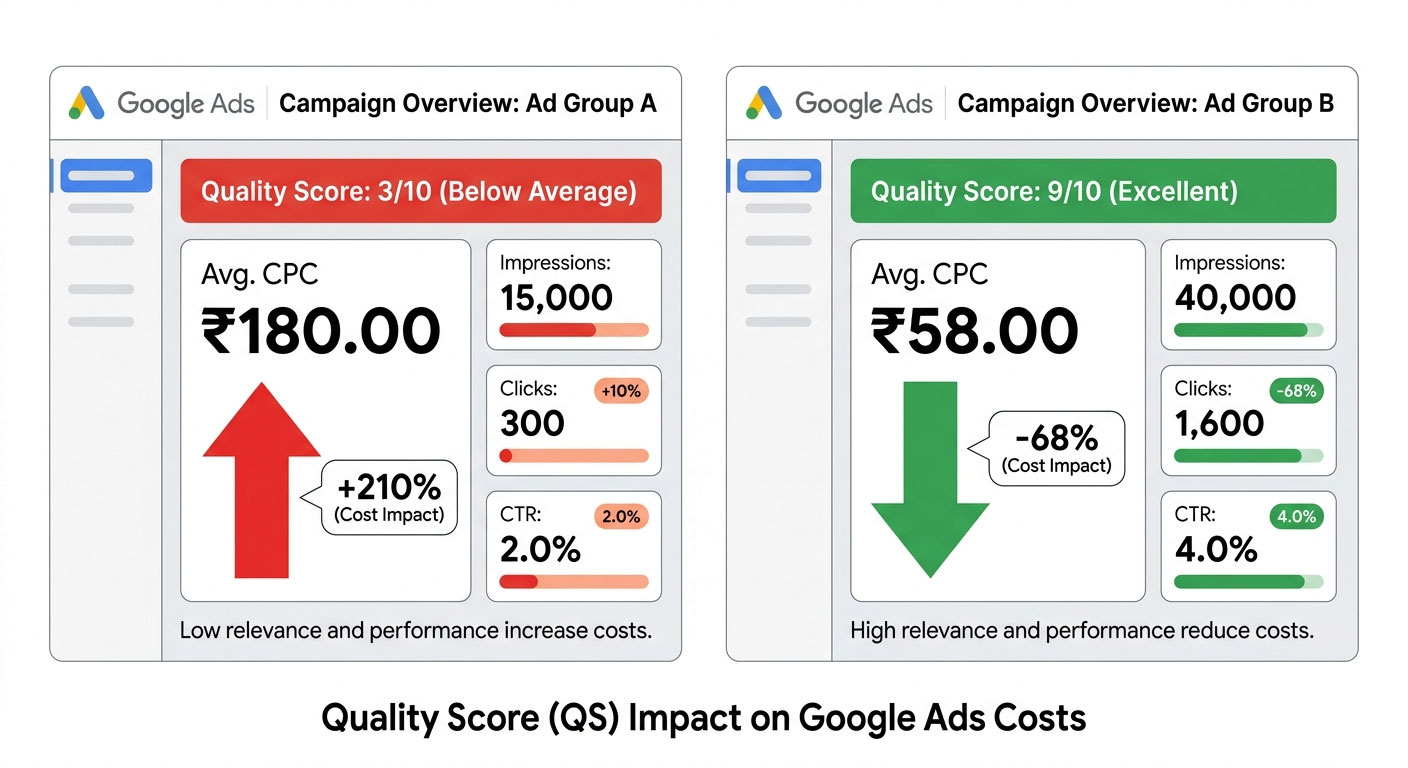
What Is Quality Score — And Why Does It Destroy Your Budget?
If you're spending money on Google Ads and your campaigns feel expensive relative to the results, there's a very good chance your Quality Score is working against you.
Quality Score (QS) is Google's 1–10 rating of how relevant and useful your ad, keyword, and landing page are to someone searching. It directly determines your Ad Rank — and by extension, what you actually pay per click.
The implications are dramatic. A higher Quality Score results in a lower CPC and a better ad position. In practice, the difference between a QS of 3 and a QS of 9 can be a 400% cost penalty — meaning you pay four times more to appear in the same position as a competitor with a better score.
Google calculates Quality Score from three components:
- Expected Click-Through Rate (CTR) — how likely someone is to click your ad for a given keyword
- Ad Relevance — how closely your ad matches the intent behind the search query
- Landing Page Experience — how relevant, fast, and useful your landing page is after the click
Each is rated as Above Average, Average, or Below Average. Your overall QS is the combined output of all three.
| Quality Score | Ad Rank Impact | CPC Effect | Status |
|---|---|---|---|
| 1–3 | Very Low | +400% CPC penalty | 🔴 Critical — fix immediately |
| 4–6 | Below Average | +25–150% CPC penalty | 🟡 Needs improvement |
| 7–8 | Good | Near benchmark | 🟢 Acceptable |
| 9–10 | Excellent | CPC discount up to 50% | 🔵 Target zone |
Now let's fix yours.
7 Fixes That Will Raise Your Quality Score (And Lower Your CPC)
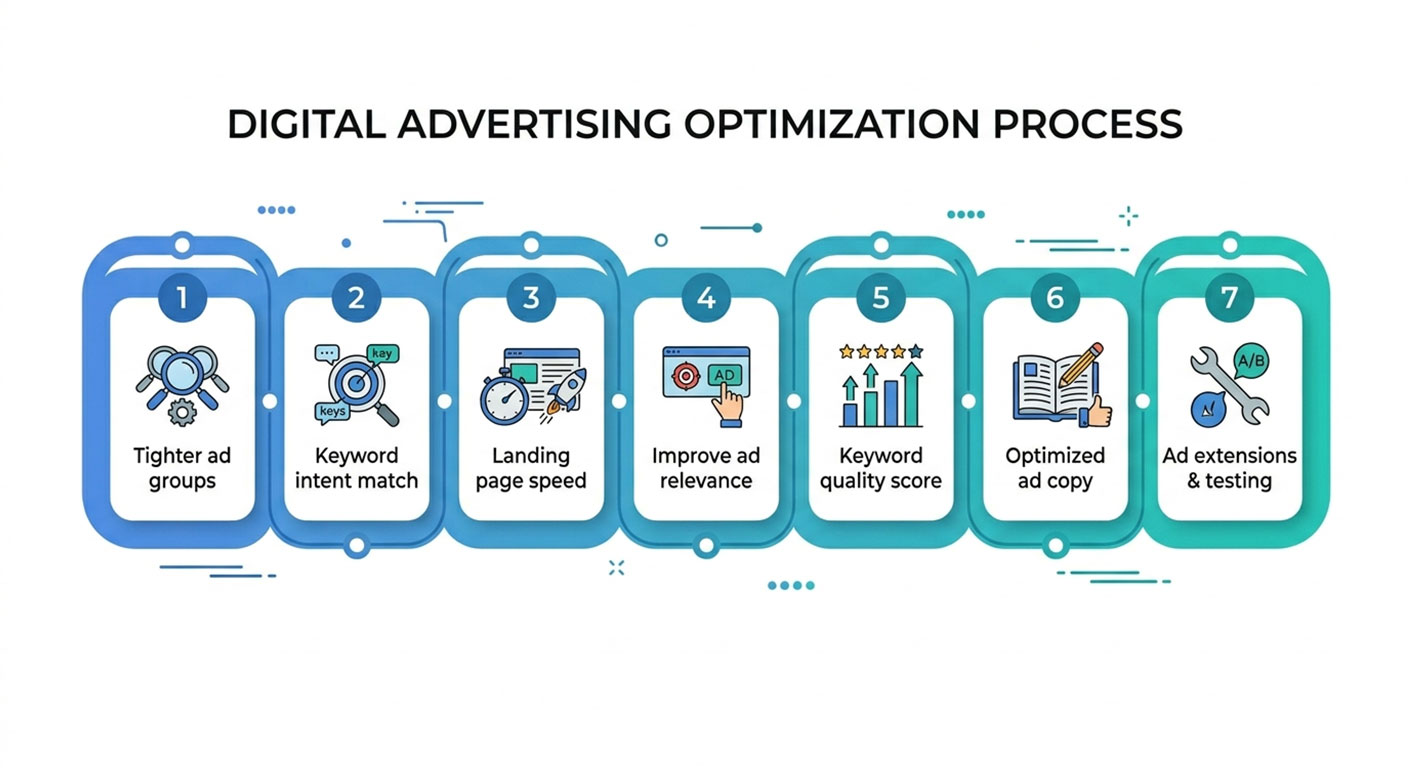
Fix #1
Break your ad groups into tighter, single-theme clusters
One of the most common mistakes in Google Ads is cramming 30–50 keywords into a single ad group and writing one set of ads for all of them. Google cannot write one ad that is relevant to 50 different queries — and your Quality Score reflects that.
The fix: restructure to Single Keyword Ad Groups (SKAGs) or tight 3–5 keyword clusters where all keywords share the same core intent. Each ad group should have its own ads that directly mirror the keywords inside it. When your ad says exactly what the user searched, your Expected CTR and Ad Relevance components both improve — sometimes by 2–3 points overnight.
Fix #2
Include the exact keyword in Headline 1 (and your display URL)
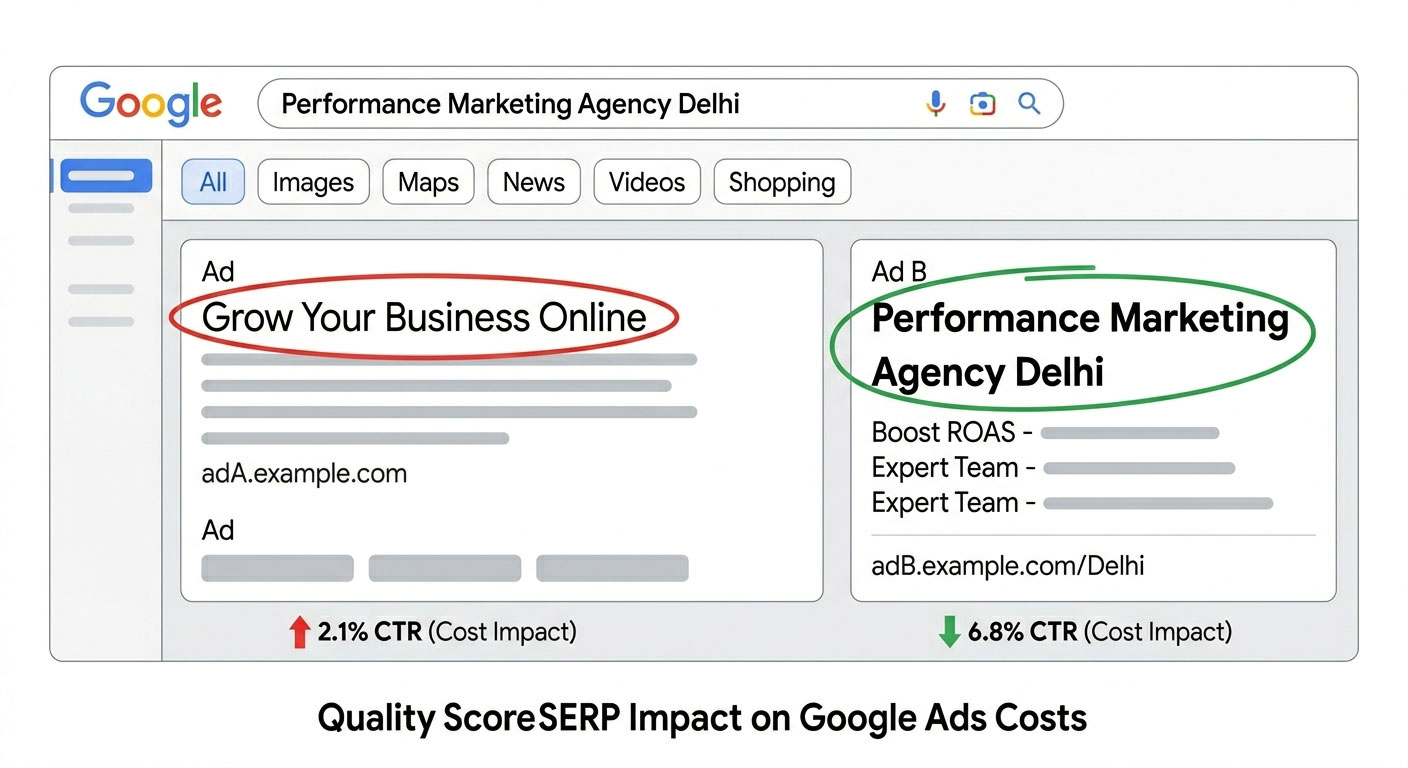
Ad Relevance is rated based on how closely your ad copy matches the keyword and search intent. The fastest way to improve it: put the keyword or a close variant in Headline 1 and in your display URL path.
For example, if your keyword is "performance marketing agency delhi", your Headline 1 should be "Performance Marketing Agency Delhi" — not something generic like "Grow Your Business Today". Google's algorithm directly compares ad copy to the keyword to assess relevance, and a keyword match in the headline also improves human CTR because the bold match text stands out in the SERP.
With Responsive Search Ads (RSAs), pin Headline 1 to position 1 so Google always serves it first.
{KeyWord:Default Headline} automatically inserts the user's search query into your headline.
Fix #3
Fix landing page relevance — the most underrated QS component
Most advertisers focus entirely on ad copy when their QS problems often live on the landing page. Google's crawler evaluates your landing page for three things: relevance to the keyword, transparency (clear information about who you are), and page experience (speed and mobile usability).
If your keyword is "meta ads management service" but your landing page talks about "full-service digital marketing", Google sees a mismatch. The fix is to build dedicated landing pages per ad group — or at minimum, per campaign theme. Each page should:
- Repeat the keyword naturally in the H1, first paragraph, and page title
- Match the ad's offer exactly (if the ad promises a "free audit", the page must lead with a free audit CTA)
- Load in under 2.5 seconds on mobile (test with Google PageSpeed Insights)
Fix #4
Improve historical CTR by pausing low-performing keywords
Expected CTR is not just about your current ads — Google factors in the historical CTR of your keywords across the entire Google ecosystem, as well as your account's history for those keywords. A keyword with a long history of low CTR pulls down your QS even if you've just written great new ads.
The fix: identify keywords with CTR below 1.5% on the Search network that have more than 100 impressions and pause them. Don't delete — pausing preserves the data for analysis. Then create new, tightly targeted ad groups for the intent those keywords represent, with better copy from Day 1.
For your surviving keywords, ensure you're running at least 3–4 RSA ad variants with different headline combinations. Google will automatically optimise toward the highest-CTR combinations over time.
Fix #5
Add all relevant ad extensions (Assets) — they boost CTR significantly
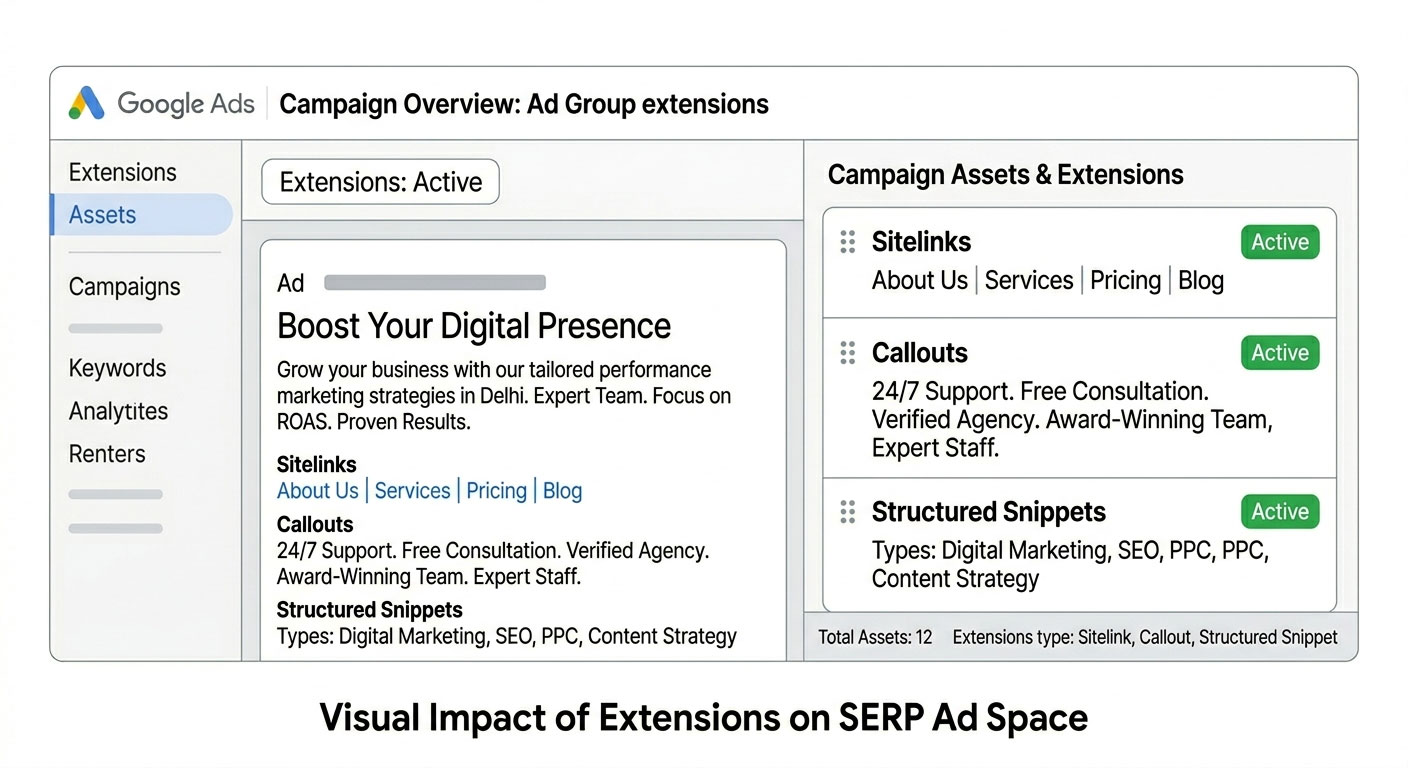
Ad extensions — now called "Assets" in Google Ads — don't directly affect your Quality Score formula, but they significantly increase your ad's Expected CTR, which is a core QS component. More extensions = more real estate on the SERP = higher probability of a click.
At minimum, every campaign should have:
- Sitelinks — 4–6 relevant page links
- Callouts — 3–4 short benefit statements
- Structured snippets — services, features, or product types
- Call extension — if phone leads matter to your business
- Lead form extension — especially effective for B2B campaigns
Accounts with all relevant extensions consistently show CTRs 10–20% higher than accounts with minimal extensions.
Fix #6
Match keyword match types to search intent — broad match needs tight negative lists
Using Broad Match keywords without a strong negative keyword list is one of the fastest ways to destroy your QS. When your ads show for irrelevant queries, impressions skyrocket while clicks don't — your CTR tanks, and your Expected CTR component degrades over time.
The 2026 fix:
- Start new campaigns on Phrase Match or Exact Match to control which queries trigger your ads
- If using Broad Match (recommended for Smart Bidding campaigns), build a negative keyword list of at least 50–100 irrelevant terms from the start
- Review your Search Terms report weekly — any query that doesn't match your offer's intent should become a negative keyword
- Add negative keyword lists at the account level for brand-safety terms, competitor exclusions, and job-seeker queries (e.g., "jobs", "salary", "career")
Fix #7
Improve mobile page speed — Google weights mobile experience heavily in 2026
Google's Quality Score algorithm in 2026 places significant weight on mobile landing page experience, particularly Core Web Vitals: Largest Contentful Paint (LCP), Cumulative Layout Shift (CLS), and Interaction to Next Paint (INP).
Over 70% of Google Ads traffic in India now comes from mobile devices — and if your landing page loads in 5 seconds on a 4G connection, your Landing Page Experience rating will be "Below Average" regardless of how relevant your content is.
Specific fixes:
- Compress images to under 100KB using WebP format
- Remove unused JavaScript (especially bloated tag manager stacks)
- Use a CDN if your site is hosted in a single region
- Implement lazy loading for below-the-fold images
- Target LCP under 2.5 seconds — test at pagespeed.web.dev
Quick-Reference: All 7 Fixes at a Glance
| # | Fix | QS Component Improved | Effort |
|---|---|---|---|
| 1 | Tighter ad groups / SKAGs | Ad Relevance + Expected CTR | Medium |
| 2 | Keyword in Headline 1 + URL | Ad Relevance + Expected CTR | Low |
| 3 | Dedicated landing pages | Landing Page Experience | High |
| 4 | Pause low-CTR keywords | Expected CTR | Low |
| 5 | Add all Assets / extensions | Expected CTR | Low |
| 6 | Negative keyword strategy | Expected CTR | Medium |
| 7 | Mobile page speed (Core Web Vitals) | Landing Page Experience | High |
The Bottom Line
Quality Score is not a vanity metric — it's a direct cost lever. An account running at an average QS of 4–5 is paying roughly 25–100% more per click than it needs to. At scale, that's hundreds of thousands of rupees wasted every month — not on the wrong audience, but on an optimisation problem that is entirely fixable.
The seven fixes above are the same changes the AdsHawk Digital team applies during every Google Ads audit. They consistently move accounts from a QS of 3–5 to 7–9 within 30–45 days of implementation.
Start with Fix #4 and Fix #2 — they require no development work and show results within one billing cycle. Then prioritise landing page improvements (Fix #3 and Fix #7), which deliver the biggest long-term compounding impact on both Quality Score and conversion rate.
Get a Free Google Ads Quality Score Audit
The AdsHawk Digital team reviews your account structure, keyword QS breakdown, and landing page experience — and delivers a prioritised fix list within 48 hours. No obligation.
Request Your Free Audit →